2010-10-12

How I Trade and Invest In Stocks and Bonds (Richard D. Wyckoff)


Wyckoff 是某天在聽香港電台《投資新世代》時經濟日報的石鏡泉介紹的,看看維基百科(link),才知Wyckoff是20世紀初的財經名人!

在網上尋找他的文章,好好彩,仍找到很多,加上迎來買了部Kindle 3,所以閱讀電子書更加方便。

首先看的是”How I Trade and Invest In Stocks and Bonds”(Internet Archive有免費copy,1924年版,見link),雖然是scanned pdf,不過有OCR,所以可以search,很方便。

雖然沒有技術分析,Richard在書中詳細講他1的投資(或投機)心法,最重要是這些論據沒有因時間而變成失效,以下是我在本書的一些jottings,希望同大家分享:

頁17
All he asks is to be told "something good." That is not speculation, it is gambling...

頁34
I found that most of (the people) wanted to lean - not to learn. They just drifted along, guided by hope of profit and pursued by fear of loss.

頁45
Before I go any further, let me say that not every man is adapted to trading in stocks. In fact, very few are fitted for the work if it is undertaken as an art, a business, a profession, or whatever else you wish to call it.

頁75
Never get married to a security.

頁88
It is poor policy, I find, to wait for Opportunity to knock at your door.

頁143
These points are about equally divided between investment and speculation, but it is so difficult to determine which one begins and the other ends that in many cases I shall be obliged to treat them in combination.

頁144
IF ONE IS NOT ADAPTED TO TRADING HE SHOULD PROVE IT TO HIS OWN SATISFACTION AND THEN ABANDON THE BUSINESS. - He should then attempt to become an intelligent and successful investor. Failing of this, he should turn to savings banks and mortgages or other non-fluctuating mediums for the investment of his funds.

2010-10-11

Kindle 2011 Hong Kong Calendar

I have brought the Kindle 3. The advantages of Kindle 3 over previous version is:
  • it is much cheaper (the Wifi version is only US$139!)
  • it natively supports Simplified and Traditional Chinese without any additional hacking
After reading many "free" e-books found on internet, I must say I am very satisfied with my new toy so far, thanks to its appropriate footprint and long battery life.

I then start to explore whether I can create a Kindle ebook myself.

I am not a writer and therefore have no content to share. But why not make a Kindle app? Franking speaking I am not using KDK (Kindle Development Kit). But using the built-in annotation and indexing mechanism of the Kindle mobi format, I find I can make a calendar.


If you have interest, please install a copy yourself:

(1) save the attached prc file (link) using "Save Link As"
(2) transfer the prc file to your Kindle document folder via USB or your Kindle email account

Since I have added the Lunar Calendar, it has Traditional Chinese characters. But I have not tested the compatibility on older Kindle models.

You can create your Appointments as follows:
  • press the 5-way as usual to your target date (similar to creating notes)
  • enter your appointment details


Afterward, your schedule will be shown on the date with a superscript note-mark as follows:


(the yellow-highlight is added by me to draw your attention - Kindle does not support color display yet!)

Hope you like it.

2010-06-08

Composing a HTML table in Gmail

In Hotmail, I can directly edit the html codes during composing an email. However, in Gmail, I cannot have this feature.

Moreover, Gmail does not have the built-in function to compose a table.

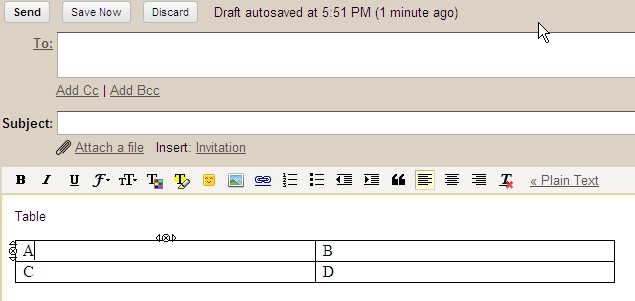
Recently, I accidentally find that the copy-and-paste feature in the Gmail preserves the formatting. So following the track, I find I can actually create a table simply by copy-and-paste an empty table from another editor (like Word)!

Though I cannot do further formatting (like column width adjustment), I find I already overcome one of the greatest deficiencies.

2010-06-07

羅家聰用經濟學談「跳樓」

見6月5月iMoney

雖然有點黑色幽默,不過當中的經濟理論如:
  • Expected Utility
  • Discount Factor
  • Utility Function sensitivity
又真是很to-the-point

2010-06-03

政府部門過去3年『僅』發生一宗電腦病毒感染事故

Am730@6月3日


各位有機會做過政府IT Projects的朋友,你相信嗎?

2010-04-17

My Facebook Friends' Profile

My original aim to us Facebook is to make reunion to my old school-mates and friends. It works (though I find some of my friends are very reluctant to open a Facebook account).

Now, I nearly log on Facebook every day. I find that my friends' activities are quite "strange":

- a few (less than 10%) are very active and makes postings every day
- many behave like a whale (surfacing to water a moment, makes comments) and disappear for months
- half of them actively play FB games (though I never try one)

Somehow, to my disappointment, I find that the posting on FB is just on acquaintance level and the communication level is very superficial.

2010-04-07

Creating Scrolling Banner using Gimp

This is my second Gimp script. (The first is 'Gimp Polaroid Filter' published in Dec 2009

Why I write this second script is triggered by my another very recent blog 'Scrolling Banner using CSS', in which I mentioned I have previously used animated GIF to give scrolling banner effect.

Yes, creating animated GIF is very tedious previously. But I can write Gimp Script-fu. Why not automate the process? So, I write my second Gimp script using the Scheme language.

Script filename: scroller.scm (the zipped form can be downloaded from here

Installation Steps: In my Windows environment, you can simply unzip the file and move it to 'C:\Program Files\Gimp-2.0\share\gimp\2.0\scripts'

Example of using the script:

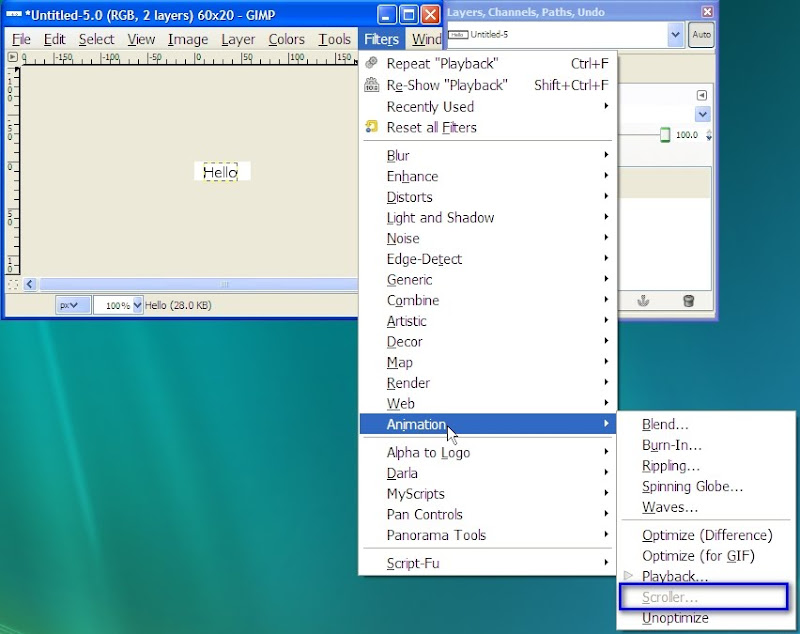
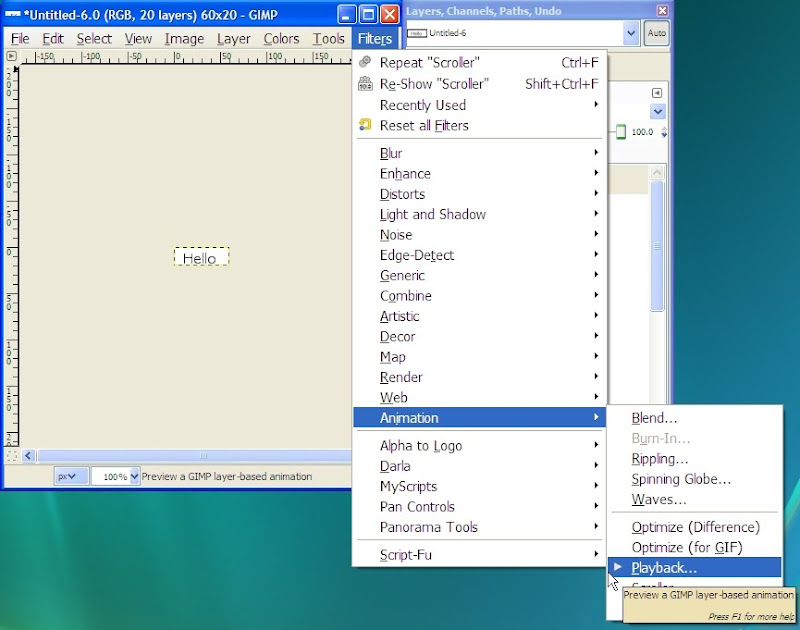
I first create a new image with a 'Hello' text. The new script is accessible via Filter | Animation | Scroller.


In the screen dump above, you can see the Scroller item. But it is still dimmed because Gimp does not like the text layer. You need to flatten the image first.


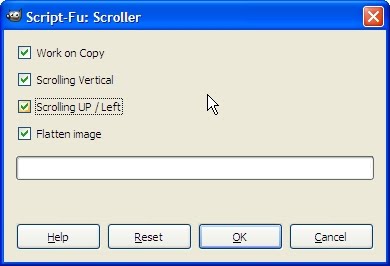
The Scroller Script-Fu dialogue has the following options:

  • Work on Copy: If checked, the script will duplicate the image file so that you think it is safer. Anyway, even you do not check this box, you can still use Gimp's undo feature to roll back
  • Scrolling Vertical: If unchecked, the scrolling direction will be horizontal
  • Scrolling Up /Left: If unchecked, the scrolling direction will be scrolling down or right
  • Flatten image: This check box is useful in case your image has multiple layers before


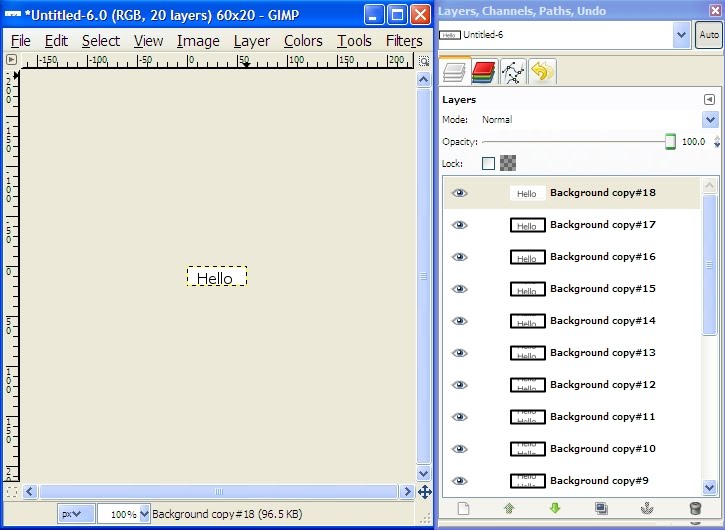
After exaction of the script, you can see Gimp has created many layers (as down in the Layer Dock above


You can use Gimp's Playback feature to preview the effect as in the above menu.


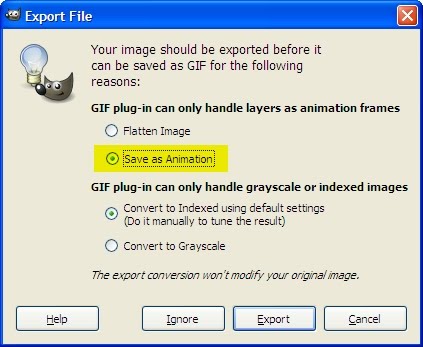
If you are satisfied with the result, you can export the result to a GIF file. Please remember to select 'Save as Animation' (highlighted option)


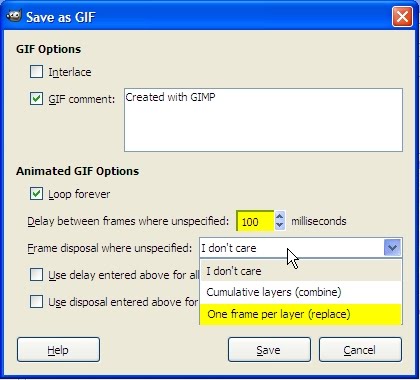
For the frame disposal option, I recommend to select 'One frame per layer (replace) because in my script, each new layer is a full size layer. I find the delay per frame at 100 ms is usually acceptable. (By the way, sending a too low value may not be effective in many web browsers).

The following is final result (displayed as GIF)

IT consumer or IT producer

Sometime ago, I read an article on notebook PC product positioning. The product manager mentioned something like they have a series of notebook PC's for a wide spectrum of users - from consumers to producers. They think IT consumers takes activities like web surfing, video watching etc, while IT producers need more powerful PC for content generation etc etc.

I cannot totally agree with this simple demarcation because I think some gamers' PC configurations are even more powerful than some servers nowadays (e.g. in terms of graphical processing power, Hard disk capacity, etc) and they are still though at consumer - am I right?

But this division of consumer vs. producer let me recall my old memories of economy classes. Consumer and Producers only appears in different context. For example:
A factory worker of course is a producer in the conventional context. But during his/her course of manufacturing, he/she will also consume some raw materials, although we can argue that the 'net' economic value of his final product should be greater than the raw materials.

From another point of view, a factory worker, after taking his salary, will consume on food, entertainment and other services, which are provided by other so caller producers.

Okay, back to the IT world. In fact, I find actually the majority of the users are just consumers. Take Facebook as example. Facebook is a collaboration platform, in which users should contribute the contents symmetrically. However, in my groups of friends, more than 80% the content generated are created by less than 20% of my friends (so-called 80-20 rule). I also found that many of my friends has logged on (from the on-line status) but never says a word on the wall or comment other's status.

I have also an IT acquaintance, who is very good at IT skills, never joined any forum, Facebook groups etc. He will visit forums every night to see others' postings and blogs. He just remains as a silent user! He has many excuses - web security, political audit, etc etc. But I just see these are excuses.

2010-04-05

Scrolling Banner using CSS

I used to create animated GIF for scrolling web banners. However, this is very time-consuming.

Yes, I know there are the following alternatives:

  • commercial GIF creator with canned animation effect (but I do not want to pay)
  • free JavaScripts using CSS (My personal principle is "Simple is beautiful and while my understanding on the complicated codes is limited and I cannot be sure the compatibility of various browser versions. A final word, I do not like a white-out effect, which is a limitation I observe in many, if not all, of these JavaScripts.)

Therefore I start to resort to CSS and JavaScript.

My aim is very simple:
  • - the scrolling banner can be in either vertical or horizontal direction
  • - the codes (CSS or JavaScript) should be in a few lines only
  • - the scrolling should be repeating and there is no blank instance

I nearly forgot to tell one limitation of my solutions is that the banner content is in graphical (i.e. not text) format.

Implementation Procedure
(1) Create a graphical banner. My preference is GIF format because its lossless pixel compression (though color depth compression is lossy - but this is not a big problem because the banner is more poster like and should have not many colors.). Another advantage of GIF is its support of transparent color.

(2) In your html codes, insert a <div> like
<div id="'scroll_div'" style="display: block; width: 400px; height: 20px; background: url(banner.gif) repeat-y 0 0px;"></div>
Remarks:
  • scroll_div is the DIV id for subsequent JavaScript manipulation
  • width and height are the associated dimension of the graphical banner
  • banner.gif is the filename of the graphical banner
  • repeat-y: this attribute is very important, because, as I said before, I like the banners to scroll with continuous repeating pattern.

(3) Create the following JavaScripts
var cur_ypos;
var div_height;
function init_scroll(){
cur_ypos = 0;
div_height = parseInt(document.getElementById("scroll_div").style.height);
div_bgr_pos = document.getElementById("scroll_div").style.backgroundPosition;
window.setInterval('scroll_banner()', 150);
}
function scroll_banner() {
cur_ypos++;
if (cur_ypos == div_height) cur_ypos = 0;
document.getElementById("scroll_div").style.backgroundPosition = '0 -' + cur_ypos + 'px';
}
Remarks:
  • The variable div_height is just implemented for the sake of efficiency because I do not want to evaluate the division height on each call
  • The key scrolling mechanism is to modify the CSS vertical background-position by one pixel
  • The scrolling speed can be modified by changing the timer value (the example here is 150 mill-seconds). Please note that there is no point to set a too small values because most JavaScript implementation cannot afford a too short timer.

(4) Start the script using the Body onload
<body onload="init_scroll();">

Demonstration:
Sorry that I cannot demonstrate the effect in Blogspot because I find I cannot manipulate ad hoc JavaScript in the Blogspot environment. So, I use again animinated GIF for demonstration:

2010-04-03

大師,點解我每次感冒…我都會咳?

這個成藥廣告,是繼《你值得擁有》(見我另一編Blog)我最覺得反感的!由於主角引用宿命論云云,所以每次在電視看到這個廣告,我都會自己加插以下旁白:

大師,點解我每天吃飽飯後,都要上廁所?
點解我心情緊張,都會手心出汗?
點解我每次消化不良,都要放屁?
等等…
大師,這是不是宿命呀?

人就是這樣,對於一些生命常態,但自己主觀不能接受的,就抱怨是宿命,將自己在事件上的角色和責任抹掉。

相反,對於一些自己「有利」的現象,就歸功於自己的力量。

「宿命」真是這樣的嗎?