2017-07-26

Take periodic photos using Pi camera and upload to Google Drive


Taking photos using the Pi camera is easy.  But how to allow remote access of the photo is a headache.  I do not want to Port Forwarding in my router (especially on SSH ports) because I think my Pi is not yet appropriately hardened.  I decide to upload the photos to the cloud.

Google has well-documented API for the Google Drive access.  In particular, I love Petter Rasmussen's gdrive, which is a CLI (command-line-interface) client for many Operating Systems because it is a static binary which does not need external libraries.

I have tried the Windows 64 bit build and the Raspberry Pi build and it works.  For the Windows build, I even try it behind the proxy server of my company and it works after I set up the http_proxy environment variable.

The github page of the gdrive already provides extensive documentation (with examples) and it is easy to adopt.  The following are my major usage:

(1) Initial setup

gdrive about

gdrive will print out a URL.  Using browser to launch the URL and enter the account password, Google will print out a verification code.  I will enter the verification code to the CLI.

There is documentation on Service Account, which is said to make server-to-Google access with password-less access.  But I find that even using the verification code approach, I find gdrive can refresh the token file automatically.  In other words, I only need to input the verification code once.  Therefore I finally do not bother to set up a Service Account.

(2) List File details

gdrive list --query "name = 'file_name_or_folder_name' "

C:\PortableApps\gdrive>gdrive-windows-x64.exe list --query "name = 'PI_PHOTO_00.jpg' "
Id                             Name              Type   Size     Created
xxxxxxxxxxxxxxxxxxxxxxxxxxxx   PI_PHOTO_00.jpg   bin    4.8 MB   2017-07-26 10:00:16

C:\PortableApps\gdrive>gdrive-windows-x64.exe list --query "name = 'pi-photos' "
Id                             Name        Type   Size   Created
xxxxxxxxxxxxxxxxxxxxxxxxxxxx   pi-photos   dir           2017-07-21 19:50:23

(3) List Files inside a folder

gdrive list --query " 'Parent_Folder_Id' in parents"

C:\PortableApps\gdrive>gdrive-windows-x64.exe list --query " '0Bzo1pJKfp9QEdVZFdVV2RTV2RVE' in parents "
Id                             Name              Type   Size     Created
xxxxxxxxxxxxxxxxxxxxxxxxxxxx   PI_PHOTO_35.jpg   bin    4.8 MB   2017-07-26 10:35:12
xxxxxxxxxxxxxxxxxxxxxxxxxxxx   PI_PHOTO_30.jpg   bin    4.7 MB   2017-07-26 10:30:12

(4) Upload File to specified folder

gdrive --parent Parent_Folder_Id Upload_Filename

(5) Delete File

gdrive delete  File_Id

I then start to code my bash script (which will be run by cron periodically) to take photo and then upload the photo.  I use the minute digits to name my photo filename and originally thought that this nomenclature can automatically recycle my photo copies without an explicit housekeeping job.  But I am wrong.  I find Google Drive allow multiple copies of the same filename (even not using the versioning feature) and these multiple copies will be assigned with different File-Id.

Worst still I find gdrive has no direct command to delete a file (or files) by filename.  I need to first list the File_id by the inputted filename and then delete them (if more than one) one-by-one.  The logic is:

gdrive list --no-header --query "name = 'Filename' " | awk '{print $1}' | xargs -n 1 gdrive delete

The xargs command is to ensure the gdrive is executed one-by-one

The following is my script:

#!/bin/bash
# use 00-59 minutes for filename recycling
DATE_MM=$(date +"%M")
cd  /home/pi/photos
raspistill -n -o PI_PHOTO_${DATE_MM}.jpg
# delete duplicated copies at Google drive
/home/pi/gdrive-linux-rpi list --no-header --query "name = 'PI_PHOTO_${DATE_MM}.jpg'" | awk '{print $1}' | xargs -n 1 /home/pi/gdrive-linux-rpi delete
# upload to pi_photos folder at Google Drive
/home/pi/gdrive-linux-rpi upload --parent xxxxxxxxxxxxxxxxxxxxxxxxxxxx --delete PI_PHOTO_${DATE_MM}.jpg

2016-01-07

Using U3 Flash Drive for CDROM emulation


I have an old U3 flash drive, which has only 1G capacity. This kind of a device can mount two drives simultaneously - one is a conventional flash drive (read/write) and one is a CDROM drive (read-only). Usually users does not care the CDROM partition and sometimes even remove it totally to spare more space from the conventional partition.

However, recently triggered by a corporate customer's site requirement that conventional flash drive is disabled but CDROM ia allowed (thanks to its read-only feature), I start to think whether I can re-use my old U3 drive for that purpose.

The first step is to create an ISO file, which should be a well-known idea if you have ever burned a disk. I choose to use InfraRecorder, because it has no embedded commercial ad and has a portable version to save the installation effort. The following screen shots illustrate the steps to build the ISO file.


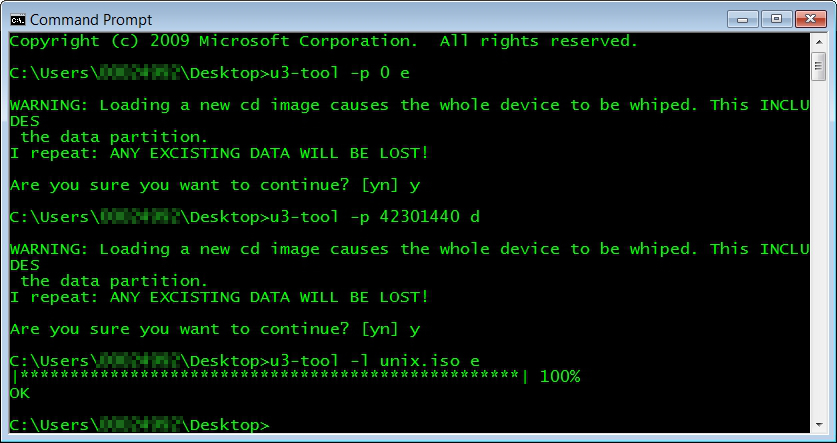
Then I download u3tool from SOURCEFORGE.NET. It is a open source tool to manipulate the U3 disk and I find it also work properly in my 64 bit Windows environment as well. The steps are simple:

(i) create the CDROM partition
u3-tool -p <size-of-iso-file> <driver letter o u3-cdrom-without-colon>
e.g. u3-tool -p 42301440 d

(ii) load the iso file
u3-tool -l <iso-filename>  <driver letter u3-cdrom-without-colon>
e.g. u3-tool -l unix.iso e


Then this CD Drive is shown in Windows Explorer as follows:


2015-09-24

Using openssl to test two way SSL connectivity

In my previous post Building a two way https web service server using Java, I said I used openssl to do the web service server testing.

In fact, before choosing openssl, I have tried other methods like curl, various Chrome extensions.  But finally I stick to openssl because of its flexibility and availability of low level output to facilitate my debugging.

In fact the script is as simple as follows:

openssl s_client -connect localhost:8000 -cert client.pem -key key.pem -CApath . -CAfile ca.pem -showcerts -debug -msg -state -crlf -ign_eof <<EOF
POST /app HTTP/1.1
hostname: localhost
Content-Type: application/x-www-form-urlencoded
Content-Length: XXX

<?xml version='1.0'?><Envelope xmlns='http://schemas.xmlsoap.org/soap/envelope/' xmlns:op='http://schemas.xyz.com/svc' xmlns:ems='http://schemas.xyz.com/ems'><Header>Header_Text</Header><Body><op:AddPbs><ems:ChannelAcctId><ems:ChannelId>06</ems:ChannelId><ems:AcctId>1234567</ems:AcctId></ems:ChannelAcctId></op:AddPbs></Body></Envelope>

EOF

Let me explain each parameter one by one:

s_client: it is the SSL/TLS client program of openssl suite
connect: it designates the web service connection details (IP address and port)
cert: it specifies the self (client) certificate to present to the host
key: it specifies the private key file signing the client certificate
CApath: it designates the folder containing the certificate chain(s)
CAfile: it designates the "trusted" CA which signs the server certificate
showcerts: it shows the whole server certificate chain
debug: it is a treasure of openssl
msg: ditto
state: ditto
crlf: in Unix, the line delimiter is LF only.  This switch will cause the content to be transmitted with CR+LF instead (but please note the Content-Length has to be modified accordingly)
ign_eof: I originally omitted this switch.  But I find it is needed because otherwise the connection is closed too early by openssl before the server can send  the response back.


Building a two way https web service server using Java


I have the following requirements:
  • to build a multi-thread http server serving inbound web service requests via POST
  • the request is not conventional SOAP but is still XML-based
  • both client and server authentication (certificate based) is needed (riding not https)

 After some googling I found that Java provides a convenient framework to deliver this capability (as in Meisch's article "Java Webservice using HTTPS part 2")

The major classes used is:
  1. com.sun.net.httpserver.HttpsServer (abstract class); and
  2. com.sun.net.httpserver.HttpHandler (interface)
As HttpsServer is an abstract class, it cannot be instantiated (creating an object via new operator).  My example class java_https_server is therefore to implement the HttpHandler interface and have a method CreateHttpServer to create an HttpsServer object via the static HttpsServer.create() method.

The logic of the program is as follows:
  1. inside the main method, after creating a dummy java_https_server object, invoke the CreateHttpServer method to create a HttpsServer object
  2. inside CreateHttpServer method, open a Java Key Store containing the web server's own certificate and the Trust Store containing the trusted client certificate (the latter is needed because I use two-way SSL).  An SSLContext object instance is linked to these two key stores.  Finally, a context (which I find useless because I cannot still associate different handler with different context) is created for the HttpsServer object.
  3. the main method continue to set up a shutdown hook to graceful termination handling
  4. since the java_https_server implements the HttpHandler interface, a handle() method is defined  This is the core running logic of the whole web service server. I have added many println statements to display the attributes of the http connection in my codes.
The source listing is as follows:

import java.io.FileInputStream;

import java.io.InputStream;
import java.io.OutputStream;
import java.io.IOException;
import java.io.File;
import java.io.FileInputStream;
import java.io.FileNotFoundException;
import com.sun.net.httpserver.HttpHandler;
import com.sun.net.httpserver.HttpsServer;
import com.sun.net.httpserver.HttpExchange;
import com.sun.net.httpserver.HttpsExchange;
import com.sun.net.httpserver.HttpsConfigurator;
import com.sun.net.httpserver.HttpsParameters;
import javax.net.ssl.KeyManagerFactory;
import javax.net.ssl.SSLParameters;
import javax.net.ssl.TrustManagerFactory;
import javax.net.ssl.SSLContext;
import java.security.KeyStore;
import java.net.URI;
import java.net.InetSocketAddress;

public class java_https_server implements HttpHandler {
private static final int HTTP_OK_STATUS = 200;
// ----------class property --------------
private String context = "/";
private int port = 8000;
private String keystorePasswordString = "password";
private String keystoreFile = "/full_path/keystore.jks";
private String truststorePasswordString = "password";
private String truststoreFile = "/full_path/truststore.jks";
// --------- Constructor -------------------
public java_https_server () {
  }
// --------------------------------------------
public HttpsServer CreateHttpServer(int port, String context) {
  HttpsServer httpServer;
  try {
    httpServer = HttpsServer.create(new InetSocketAddress(port), 0);
    SSLContext sslContext = SSLContext.getInstance("TLS");
    // server keystore
    char[] keystorePassword = keystorePasswordString.toCharArray();
    KeyStore ks = KeyStore.getInstance("JKS");
    ks.load (new FileInputStream(keystoreFile), keystorePassword);
    KeyManagerFactory kmf = KeyManagerFactory.getInstance("SunX509");
    kmf.init (ks, keystorePassword);
    // server truststore
    TrustManagerFactory tmf = TrustManagerFactory.getInstance("SunX509");
    char[] truststorePassword = truststorePasswordString.toCharArray();
    ks.load (new FileInputStream(truststoreFile), truststorePassword);
    tmf.init (ks);
    sslContext.init(kmf.getKeyManagers(), tmf.getTrustManagers(), null);
    // create an anonymous inner class HttpsConfigurator to require client certificate
    HttpsConfigurator configurator = new HttpsConfigurator(sslContext) {
      public void configure (HttpsParameters params) {
        SSLParameters sslParams = getSSLContext().getDefaultSSLParameters();
        sslParams.setNeedClientAuth(true);
        params.setSSLParameters(sslParams);
        }
      };
    httpServer.setHttpsConfigurator(configurator);
    //Create a new context for the given context and handler
    httpServer.createContext(context, this);
    //Create a default executor
    httpServer.setExecutor(null);
    }
  catch (Exception e) {
    e.printStackTrace();
    return null;
    }
  return httpServer;
  } // method CreateHttpServer
// --------------------------------------------
public void handle(HttpExchange t) throws IOException {
  URI uri = t.getRequestURI();
  String response;
  System.out.println ("LocalAddress: " + t.getLocalAddress().toString());
  System.out.println ("RemoteAddress: " + t.getRemoteAddress().toString());
  System.out.println ("URL is: " + uri.toString());
  System.out.println ("Method: " + t.getRequestMethod());
  System.out.println ("Client Certficate: " +
    ((HttpsExchange)t).getSSLSession().getPeerCertificateChain()[0].getSubjectDN());
  if (t.getRequestMethod().equals ("POST")) {
    InputStream is = t.getRequestBody();
    byte[] data = new byte[100000];
    int length = is.read(data);
    if (length == 100000)
      System.out.println ("Warning: the input buffer is FULL!");
    System.out.println ("Request Length: " + length);
    data = java.util.Arrays.copyOf(data, length); // trim the array to the correct size
    System.out.println ("Request Body:[" + new String(data) + "]");
    is.close();
    response = "Give your response here";
    }
  else {
    response = "Error";
    }
  //Set the response header status and length
  t.sendResponseHeaders(HTTP_OK_STATUS, response.getBytes().length);
  //Write the response string
  OutputStream os = t.getResponseBody();
  os.write(response.getBytes());
  os.close();
}
// --------------------------------------------
public static void main(String[] args) throws Exception {
  java_https_server server = new java_https_server();
  System.out.println("Use Ctrl-C (foreground) or \"kill -15 (background)\" to stop me");
  final HttpsServer httpServer = server.CreateHttpServer(server.port, server.context);
  Runtime.getRuntime().addShutdownHook(new Thread() {
    @Override
    public void run() {
      System.out.println("Stopping Server..");
      httpServer.stop(0);
      System.out.println("Server stopped");
      } // run()
    });
  httpServer.start(); // Start the server
  System.out.println("Server is started and listening on port "+ server.port);
  } // method main
} // class java_https_server

Some example runtime output is as follows:
$ java -cp . java_https_server
Use Ctrl-C (foreground) or "kill -15 (background)" to stop me
Server is started and listening on port 8000
LocalAddress: /127.0.0.1:8000
RemoteAddress: localhost/127.0.0.1:52204
URL is: /app
Method: POST
Client Certficate: CN=ccm010, OU=xxx, O=xxx, L=xxx, ST=xxx, C=HK
Request Length: 385
Request Body:[<?xml version='1.0'?><Envelope xmlns='http://schemas.xmlsoap.org/soap/envelope/' xmlns:op='http://schemas.xyz.com/svc' xmlns:ems='http://schemas.xyz.com/ems'><Header>Header_Text</Header><Body><op:AddPbs><ems:ChannelAcctId><ems:ChannelId>06</ems:ChannelId><ems:AcctId>1234567</ems:AcctId></ems:ChannelAcctId></op:AddPbs></Body></Envelope>]
Stopping Server..
Server stopped

I will cover how to test using openssl with client certificate in the next post.

Using openssl to test two way SSL connectivity


2015-06-30

Using libxml for XPath

With the proliferation of presentation of data using XML, I find parsing the data is not easy as more and more ingredients (like attributes, name spaces) are introduced.  Up to now, I still find using XPath syntax to represent XML nodes is the best because it simplifies the complicated data hierarchy structure into the conventional slash form, like:
/A/B/C
to select the C element in the XML
<A>
  <B>
    <C/>
  </B>
</A>
(example borrowed from https://en.wikipedia.org/wiki/XPath)

Although I have used Java's built-in XPath features previously, when I have a C project, I need to resort to external library for the job.  I finally choose libxml.  One of the headaches in libxml is its memory management because otherwise you will induce memory leakage easily.
This document describes my learning.

This source code of my example is xpath_demo.c and the full listing is included in another post (link).

Compilation
Most of the installation of libxml is at /usr/local, therefore the sample program xpath_demo.c is compiled with the following switches:
cc -o xpath_demo -L/usr/local/lib -R/usr/local/lib -lxml2 -I/usr/local/include/libxml2 xpath_demo.c

Program Structure
The program has only two functions, the main function (which includes most of the logic) and register_namespaces (which is copied from libxml site for the name space registration)

Program Usage
The simplest usage is:
xpath_demo xml_filename xpath_expression
If there is name space, then the usage will be:
xpath_demo xml_filename xpath_expression name_space_list

Pseudo Codes

Invoke libxml function
Input/Output
Outstanding Object
xmlParseFile
Input: xml filename
Output: xmlDocPtr
xmlDocPtr
xmlPathNewContext
Input: xmlDocPtr
Output: xmlXPathContextPtr
xmlDocPtr
xmlXPathContextPtr
xmlXPathRegisterNs (only applicable for xml with namespace)
Input: xmlXPathContextPtr
namespace_prefix
namespace_URL

xmlXPathEvalExpression
Input: XPath_Expression,
xmlXPathContextPtr
Output: xmlXPathObjectPtr
xmlDocPtr
xmlXPathContextPtr
xmlXPathObjectPtr
xmlXPathFreeContext

xmlDocPtr
xmlXPathObjectPtr
Check if xmlXPathNodeSetIsEmpty
Input: xmlXPathObjectPtr->nodesetval

Retrieve the node:
xmlXPathObjectPtr ->nodesetval->nodeTab[0]


Retrieve the text of the node
xmlNodeGetContent
Input: xmlNode *
Output: xmlChar *
xmlDocPtr
xmlXPathObjectPtr
xmlChar * node_text
xmlFree (node_text)
xmlXPathFreeObject(xmlXPathObjectPtr)

xmlDocPtr
Final Clean up
xmlFreeDoc(xmlDocPtr);
xmlCleanupParser();

Nil

The "simplified" print out of various inputs are shown as follows:
cat data.xml
<?xml version='1.0'?>
<Envelope>
<Header>Header_Text</Header>
<Body attribute1='funny'>
<Field1>Value1</Field1>
<Field2>Value2</Field2>
</Body>
</Envelope>

xpath_demo error.xml /FIELD1
I/O warning : failed to load external entity "error.xml"
Error: Document not parsed successfully.

xpath_demo data.xml /Envelope/Body
node-text: "
Value1
Value2
"
Remark: According to the specification, the text of node includes all the text of its daughter nodes as well.

xpath_demo data.xml /Envelope/Body/Field1
node-text: "Value1"

xpath_demo data.xml /Envelope/Body/Field3
Empty

Cases with Name Space
Personally I do not like name space in XML because it is awkward.  Anway, libxml does support it, with an additional step to register the name space list.

An XML file (ns_data.xml) with name space is shown below:

<?xml version='1.0'?>
<Envelope xmlns:ns1='http://www.domain.com/ns/sample'>
<Header>Header_Text</Header>
<Body name='value'>
<ns1:Field1>Value1 in ns1</ns1:Field1>
<Field1>Value1 without NS<Field1>
</Body>
</Envelope>

A nameapace ns1 is defined in the root element <Envelope>.  You can see there are two tags with name Field1, one of which with name space ns1.  They are can accessed separately as follows:

xpath_demo ns_data.xml /Envelope/Body/ns1:Field1 ns1=http://www.domain.com/ns/sample
node-text: "Value1 in ns1"

xpath_demo ns_data.xml /Envelope/Body/Field1 ns1=http://www.domain.com/ns/sample

node-text: "Value1 without NS"

xpath_demo.c

/*
File : xpath_demo.c
Description: A demo C program to print the text of a node from a xpath expression
Usage: xpath_demo.c xml_file xpath_expression
Dependence: libxml2
How to make:
cc -o xpath_demo -L/usr/local/lib -R/usr/local/lib -lxml2 -I/usr/local/include/libxml2 xpath_demo.c
*/

#include <libxml/parser.h>
#include <libxml/xpath.h>
#include <libxml/xpathInternals.h>   /* for function xmlXPathRegisterNs */
#include <assert.h>

/* Function Prototype */
int  register_namespaces(xmlXPathContextPtr xpathCtx, const xmlChar* nsList);

/* ===================================================================== */
int main(int argc, char **argv) {

xmlDocPtr doc;
/* xmlNodeSetPtr nodeset; */
xmlXPathObjectPtr result;
xmlNode *node;
xmlChar *node_text;
xmlXPathContextPtr context;
char *filename;
xmlChar *xpath_expression;
xmlChar *nsList;

if ((argc != 3) && (argc != 4)) {
  fprintf(stderr, "Usage: %s xml_file xpath_expression  [<known-ns-list>]\n", argv[0]);
  fprintf(stderr, "where <known-ns-list> is a list of known namespaces\n");
  fprintf(stderr, "in \"<prefix1>=<href1> <prefix2>=href2> ...\" format\n");
  return(1);
  }
filename = argv[1];
xpath_expression = (xmlChar*) argv[2];

fprintf (stderr, "DEBUG: LIBXML_VERSION is " LIBXML_VERSION_STRING "\n");

doc = xmlParseFile(filename);
if (doc == NULL ) {
  fprintf(stderr, "Error: Document not parsed successfully.\n");
  xmlCleanupParser();
  return 1;
  }

context = xmlXPathNewContext(doc);
if (context == NULL) {
  fprintf(stderr, "Error in xmlXPathNewContext\n");
  xmlFreeDoc(doc);
  xmlCleanupParser();
  return 2;
  }

if (argc == 4) {
  nsList = (xmlChar*) argv[3];
  if (register_namespaces(context, nsList) < 0) {
    fprintf(stderr,"Error: failed to register namespaces list \"%s\"\n", nsList);
    xmlXPathFreeContext(context);
    xmlFreeDoc(doc);
    xmlCleanupParser();
    return 3;
    }
  }
result = xmlXPathEvalExpression(xpath_expression, context);
xmlXPathFreeContext (context);
if (result == NULL) {
  fprintf(stderr, "Error in xmlXPathEvalExpression\n");
  xmlFreeDoc(doc);
  xmlCleanupParser();
  return 4;
  }

/*
xmlXPathEvalExpression() call returns a set of ALL the nodes that match the expression
We are only interested in the first node returned
*/

if (xmlXPathNodeSetIsEmpty(result->nodesetval)) {
  printf ("Empty\n");
  xmlXPathFreeObject(result);
  xmlFreeDoc(doc);
  xmlCleanupParser();
  return 5;
  }

/* Retrieve the data */
node = result->nodesetval->nodeTab[0];
node_text = xmlNodeGetContent(node);
/* xmlNodeGetContent retrieves the text values of all children too.  This is correct */

fprintf (stderr, "DEBUG: node-type: %d node-name: %s\n" ,node->type, node->name);
xmlAttr *attr = node->properties;
while ( attr ) {
  fprintf (stderr, "DEBUG: attribute-name:%s attribute-value:%s\n" , attr->name, attr->children->content);
  attr = attr->next;
  } /* while */
printf ("node-text: \"%s\"\n", node_text);
xmlFree (node_text);
xmlXPathFreeObject(result);

/* Final clean up */
xmlFreeDoc(doc);
xmlCleanupParser();
return (0);
} /* main */

/**************************************************************************************/
/* The following fucnction is extracted from http://www.xmlsoft.org/examples/xpath1.c */
/**************************************************************************************/

/**
 * register_namespaces:
 * @xpathCtx:           the pointer to an XPath context.
 * @nsList:             the list of known namespaces in
 *                      "<prefix1>=<href1> <prefix2>=href2> ..." format.
 *
 * Registers namespaces from @nsList in @xpathCtx.
 *
 * Returns 0 on success and a negative value otherwise.
 */
int
register_namespaces(xmlXPathContextPtr xpathCtx, const xmlChar* nsList) {
    xmlChar* nsListDup;
    xmlChar* prefix;
    xmlChar* href;
    xmlChar* next;

    assert(xpathCtx);
    assert(nsList);

    nsListDup = xmlStrdup(nsList);
    if(nsListDup == NULL) {
        fprintf(stderr, "Error: unable to strdup namespaces list\n");
        return(-1);
    }

    next = nsListDup;
    while(next != NULL) {
        /* skip spaces */
        while((*next) == ' ') next++;
        if((*next) == '\0') break;

        /* find prefix */
        prefix = next;
        next = (xmlChar*)xmlStrchr(next, '=');
        if(next == NULL) {
            fprintf(stderr,"Error: invalid namespaces list format\n");
            xmlFree(nsListDup);
            return(-1);
        }
        *(next++) = '\0';

        /* find href */
        href = next;
        next = (xmlChar*)xmlStrchr(next, ' ');
        if(next != NULL) {
            *(next++) = '\0';
        }
        /* do register namespace */
        if(xmlXPathRegisterNs(xpathCtx, prefix, href) != 0) {
            fprintf(stderr,"Error: unable to register NS with prefix=\"%s\" and href=\"%s\"\n", prefix, href);
            xmlFree(nsListDup);
            return(-1);
        }
    }

    xmlFree(nsListDup);
    return(0);
}

2014-11-06

太古坊的「真我」Retake


2009年那時相機的Miniature Fake效果(或稱Tilt-shift Fake)還未普及,我是將用傻瓜機拍的相片用電腦Gimp軟件加工來做散景,以滿足未有大光圈鏡頭拍不到淺景深相片的心願,其中一輯是在太古坊的拍的「真我」(連結)。

早前終於在二手市場買了支CCTV鏡頭,是Fujian 35mm F/1.7,散景效果不錯,今天再經過太古坊,便用它再拍一次比較比較。


2014-10-20

Living Fearlessly


我兒時沒有如很多的小朋友一樣「怕黑」,但很早便知自己有點畏高。隨著年紀長大,了解到畏高是非理性的,明白扶手欄杆不會無端端斷下來,明白外牆玻璃不會無端端碎裂,以致自己會突然由高處墜下。但是,只要視覺知道自己身在高處,心便會寒起來,腳便會抖震。我努力希望可解決畏高的恐懼,心理上,嘗試閉上眼幻想自己從高處墜下的感覺,現實上,亦玩過一次海洋公園的跳樓機。(真是很驚!)但現在我只可以說我的畏高只是被我的理性壓抑著,只是不會影響到我的生活罷了,但我仍是不敢玩笨豬跳。

我另一缺憾是不能看恐怖故事(小說,電視劇,電影等),只要是情節有故事引線凝聚小小恐怖氣氛,我便接受不了。其實,我理性上,我知道我只要跨過那個所謂恐怖情節,就算是後來有甚麼血甚麼嘔心的,其實已經沒事了。所以我了解到我的驚恐源於對未來不確定的東西。

事實上,這種感覺真是影響到我的日常生活,我是一個容易緊張的人,容易手心,前額,腋下大量出汗。

較早時,由於心翳不舒服,心跳很快,加上我有膽固醇高的病歷,醫生安排了我做一連串的測試:靜態心電圖,運動心電圖,心臟超聲波,心臟電腦掃描,也找不到問題。其實我有懷疑過是否自己壓力太大,但是那段時間工作不忙,沒有很多壓力,家庭也沒有特別問題。

我以前常同人笑說:恐懼(驚)的最高境界就是不知道驚甚麼。所以我想,如果我想克服恐懼,首先要承認自己恐懼,另外,要知道自己恐懼甚麼。

近來,由於買了本書:鍾灼輝的《我死過,所以知道怎麼活:與死神相遇的11分鐘》,順便在互聯網看其他人講Near Death Experience(NDE/瀕死經驗),看過Anita Moorjani的分享,最令我感受深的,就是她提倡的living fearlessly(連結)。人生或許最恐懼的就是死亡,但是一個有瀕死經驗的人告訴我們可無懼地生活,那是多麼的震撼哩!

2014-10-19

靜坐鬧鐘 Bodhi Timer


我在屋企是有靜坐的習慣,我自己是用電子表來計時的,但坦白講,它的電子響鬧是不太適合靜坐用的。在外面禪修,導師常用引磬來提示時間的,它的聲響和餘音是很適合在安靜的環境下作出提示。

近期溫暖人間(第395期)有介紹用智能手機App "Insight Timer Meditation Timer" 來做禪修鬧鐘(連結),其實我先前也曾有這想法,但始終缺乏安全感,覺得如果驚App失效會使靜坐時心緒不寧。

儘管上網看看,評語又Okay喎,但我一向不喜歡App需要太多的權限,我發覺Insight Timer Meditation Timer要求的權限太多,如:

  • 應用程式內購買
  • 尋找裝置上的帳戶
  • 接收網際網路資料
  • 修改系統設定
  • 完整網路存取權

加上它很"大食",要成10M記憶,(我一向奉行簡約主義,其實是我手機很低檔!)所以我再在Google Play找找其他類似的程式。

真是琳瑯滿目,但我其實只是要找一個Timer罷了!

終於發現一個叫 "Bodhi Timer" 的App (連結),它乎合我的要求,需要的記憶只是1.8M,而且沒有其他如上網的權限,加上是開源,亦加上一份信心。

不過,最重要重要還是程式要穩定,我見它的Timer engine is 用另一開源程式 Ralph Gootee TeaTimer。而響鬧就用Android內建的通知系統,故可不需要將電話Keep Awake(亦可省電)

現在用了幾次,非常滿意,我很喜歡它的引磬聲效,而且它容許將音量調教成百分比(如圖),故可將電話響鬧音量保留而將修禪響鬧音量收細。


現在,只是發現一小小bug,是在測試聲響時如按下停止,以後便不能再發聲,要害我做一次Force Stop,不過這也不是大問題,我會繼續使用它來靜坐鬧鐘 。

P.S. 在靜坐時,我一定會將電話定為飛行模式(連Wifi也關閉),因我不想有電磁波干擾。

2014-08-14

英文諺語mdx版


我多年前買了一本英文諺語書,希望可寫英文時可多用一點諺語以增加可讀性,但我遇到兩個困難:(1) 如何隨時在幾千個諺語選出合適的諺語?(2) 很多時在腦海想出的是中文成語,很難做好中英對照。

現在智能手機很普及,我也用字典 app 隨時查閱生字,而中英雙向也很方便。(我用的是 mdict。忽發奇想,可否將英文諺語做成字典格式?

在網上找找資料,mdict 用的字典格式是 mdx,而且也有 mdx 生成器(字典製作工具),所以我首先做一迷你版以作proof-of-concept,證實可行。然後在網上搜羅大量英文諺語(及其中文翻譯),便開始便校對,de-duplication 和關鍵詞 indexing,結果我做了 3341 則英文諺語。


 安裝方法(以Android為例 )

(1) 自在這裡下載mdx檔案。

(2) 通常檔案會被送在/sdcard/download,但如果字典app是mdict,便要將它搬到/sdcard/mdict/doc

(3) 由於很多關鍵詞都可指向多過一條條目,所以記緊要turn on "multi-dictionary mode"


(4) 如輸入英文,字典便可搜索出關鍵詞出現的數目(如conscience有12條)


(5) 選取關鍵詞便列出其下的諺語(英中對照)


(6) 你亦可單用中文輸入,例如單入「一」字便列出以下條目:


希望大家覺得有用!