2009-10-23

CTI (Computer Telephony Integration) for SugarCRM

Recently I come across SugarCRM. It has a Community Edition which I do not need to pay. Moreover, since it is open-source, I can realize some customization easily.

I have experience in CTI (Computer Telephony Integration). But what I can search around SugarCRM is its integration with Asterisk, which is also an open source telephony project.

Because I have already an Avaya installation base, I study whether I can do some quick start work easily.

What I need are two functions:

(1) Screen Pop
To pop up the SugarCRM screen based on the Calling Line Identity (CLI)

(2) Click to Dial
Turn the phone number in the SugarCRM screen to a link that is clickable and activate automatic phone dialling

For those readers which are familar with CTI, these are just very basic features. But it is achievable for SugarCRM, this is already a great time-saver for the CRM users.

I tackle the problem in the following ways:

(1) Screen Pop
Since SugarCRM is web-based, I can simply ask the browser to navigate to a specific link.

The first question is what the link is.

In SugarCRM, I make a search with a phone number. Then I get the following screen.
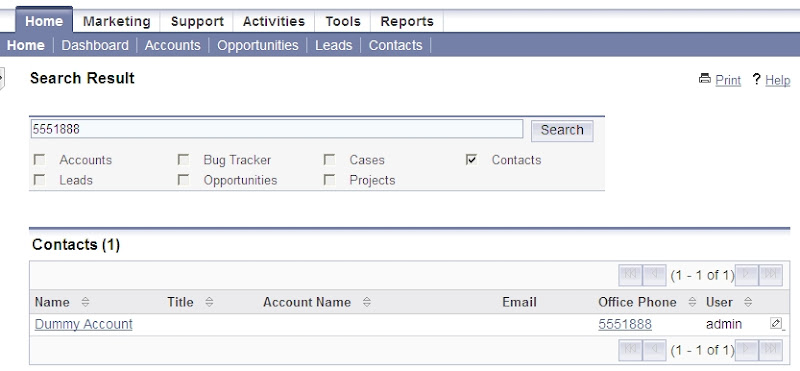

Great, I find the URL is
http://127.0.0.1/sugarcrm/index.php?module=Home&query_string=test&advanced=true&action=UnifiedSearch&search_form=false&query_string=5551888&search_mod_Contacts=true
5551888 is the phone number I have typed.
Therefore in .NET code, I use:
url_str = "http://127.0.0.1/sugarcrm/index.php?action=UnifiedSearch&search_form=false&advanced=false&query_string=" _
& SkpSock1.CLID & "&search_mod_Contacts=true"
System.Diagnostics.Process.Start(url_str)
Here, SkpSock1.CLID is my CTI object to collect the CLID (Calling Line Identity) property.

(2) Click to Dial
I find SugarCRM has Skype integration, in which it will convert a phone number to a clickable link. First you need to turn this feature on in the Administration screen, as follows:

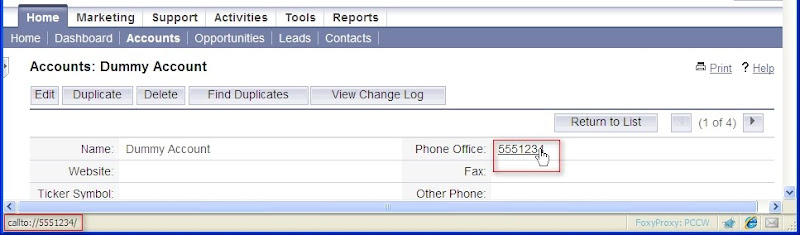
After the feature activation, you will find that when you put a mouse pointer over a phone number, you can find it the associated link is :
callto://5551234/
In Windows, each URL protocol can be managed by the "Folder Option" in the Windows Explorer. (Someone suggested registry hack. But I prefer the conventional way.)
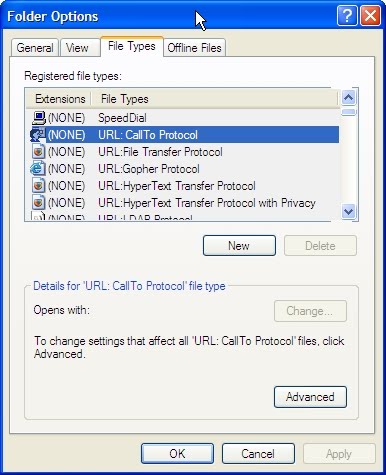
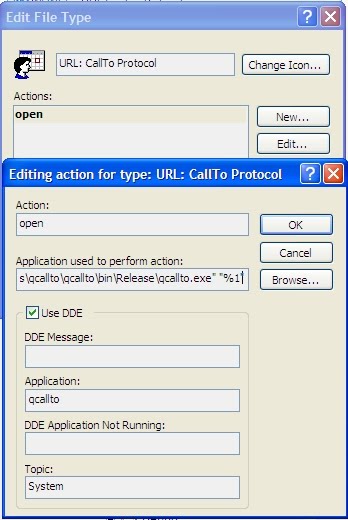
After pressing the "Advanced" button and then the "Edit" button, you can set your preferred program to handle this protocol. In my case, I have

written a program called "qcallto.exe". Windows will pass the link a program parameter to it.
Finally, a point of SugarCRM hack. As shown in the SugarCRM adminstration screen, it requires a phone number to conform to certain format (e.g. prefixed with a plus sign). I do not like this convention. Why cannot SugarCRM simply treat all the phone number clickable?

Thanks to the PHP open sources, I find that in "c:\Inetpub\wwwroot\sugarcrm\include\utils.php" (the actual directory depends on your installation), there is a php function will determine whether a phone number is clickable:

Original:
function skype_formatted($number){
 if(isset($_REQUEST['action']) && $_REQUEST['action']=="Popup") {
  return false;
  }
 else {
   return substr($number, 0, 1) == '+' || substr($number, 0, 2) == '00' ||
   substr($number, 0, 2) == '011';
  }
 }

I change it to
function skype_formatted($number){
 if(isset($_REQUEST['action']) && $_REQUEST['action']=="Popup") {
  return false;
  }
 else {
  return 1;
 }
}

Some final words... Although my implemented solution is Avaya-based, it is easily portable to other platforms (even for a modem connected phone line) easily.

2009-10-12

Why DC cannot shoot a picture with shallow depth of field

I carry an Optio S3 to make ad hoc photography.

According to the specification, the tiny camera has an aperture f2.6 - f4.8

However, even at an aperture f2.6, I can never shoot a picture with sufficient shallow depth of field (DOF), except in macro mode of course.

I start to ask why.

The most authoritative reference (but hard to understand) about Depth of Field is at Wiki (link http://en.wikipedia.org/wiki/Depth_of_field)

It gives complicated formula to show the relation of DOF vs. format size (though roughly speaking, DOF is inversely proportional to format size). Since my DC has a small CCD, the DOF is less shallow than the conventional SLR.

However, I try to associate the problem with APS-C or Four Thirds or micro Four Thirds.

In these cases, usually, we will use a crop factor to represent the effective focal length at full-frame (FF, at 35mm) format size . For instance, even you use a lens with 18mm on DSLR with crop factor 1.6, its effective angle of view is just same as 28.8mm at FF.

Please note that aperture is actually stated in F-number (the ratio of focal length to effective aperture diameter).

Then why not use similar the crop factor to calculate the effective DOF?

For instance, my Optio S3 has the focal length 5.8mm (equivalent to 35mm at FF). This means that the crop factor is about 6X.

Then even at aperture f2.6, the "equivalent" aperture at FF is already 6x2.6 = 15.6

This explains why I cannot shoot at shallow DOF even with the largest aperture (smallest F-number) because its FF-equivalent aperture at 15.6!

2009-10-09

Using COM objects in VB.NET

I am an old-fashioned guy and right now even though I uses VB.NET for my new programming, I still need to resort to old COM objects sometimes.

I find there is not much references to facilitate the process (e.g. I do not like command line tools). If I have a VB6 project orginally, the Studio Express can import it automatically. But if I starts a new .NET project, I find the following procedures is the quickest:

(1) Add the COM reference in the "Tools" | "Choose Toolbox Items" menu, so that the object is selectable in the left Toolbox


(2) Choose the COM Components Tab. If your object has been registered before hand, it is listed. Otherwise, click the Browse button to include it in the list


(3) Then you will find the Componet will appear in the left Toolbox. You then can drag it into your form.


(4) You will find VB.NET will automatically add appropriate references in your Project Properties, as in the following screen dump. In my cases, VB.NET add two references: one is the Interop and one is the AxInterop

2009-08-24

高清無用!

當人人都「講」高清時,我發看很多人其實都將Windows的display解像度set得比native低(可能使用者有老花?),見MSDN Blog Follow-up on High DPI resolution


從圖可見,只有55%的人用native resolution,可悲!

2009-08-06

Quick Building a Web service client using Axis

After some studies, to my surprise, building a web service client using the Axis library (not the web service itself) is in fact very easy. I would like to summarize my experience in this blog.

  1. Download Axis from the Apache web site and expand the zip file (Remark: in fact the whole package includes the server code. To build a client, only the jar files are needed. But for simplicity and because of the limited extra hard disk space, I recommend to expand the whole package).
    In my example, I have downloaded Axis version 1.1 and put it at /home/craft/whc/axis-1-1

  2. Download the WSDL file of the web service. In this case, I have chosen the free stock quote example at webservicex at http://www.webservicex.net/stockquote.asmx?wsdl and store it in /home/craft/whc/StockQuote.wsdl

  3. Use the WSDL2Java tool from Axis to crate the stub codes. Since we need to refer to the jar files in the Axis, I have built a script with classpath set appropriately
    #!/bin/sh
    java -classpath "/home/craft/whc/axis-1_1/lib/axis.jar:
    /home/craft/whc/axis-1_1/lib/log4j-1.2.8.jar:
    /home/craft/whc/axis-1_1/lib/commons-logging.jar:
    /home/craft/whc/axis-1_1/lib/commons-discovery.jar:
    /home/craft/whc/axis-1_1/lib/wsdl4j.jar:
    /home/craft/whc/axis-1_1/lib/jaxrpc.jar:
    /home/craft/whc/axis-1_1/lib/saaj.jar"
    org.apache.axis.wsdl.WSDL2Java StockQuote.wsdl
    The resultant files will be created at /home/craft/whc/NET/webserviceX/www

  4. Create the simple client code (StockClient.java) as follows (I have hard-coded MSFT (Microsoft) for the stock code)
    import java.net.URL;
    import org.apache.axis.client.Service;
    import org.apache.axis.client.Call;

    public class StockClient {
    public static void main(String[] args) throws Exception {

    NET.webserviceX.www.StockQuote service = new NET.webserviceX.www.StockQuoteLocator();

    NET.webserviceX.www.StockQuoteSoap port = service.getStockQuoteSoap();
    String result = port.getQuote("MSFT");
    System.out.println("Result = "+result);
    }
    }

  5. Compile the client code with a script as follows (Please note that I have deliberately omitted the wsdl4j.jar because the wsdl file is no longer processed at run time and ass a dot (current directory in the classpath)
    #!/bin/sh
    javac -source 1.5 -classpath "/home/craft/whc/axis-1_1/lib/axis.jar:
    /home/craft/whc/axis-1_1/lib/log4j-1.2.8.jar:
    /home/craft/whc/axis-1_1/lib/commons-logging.jar:
    /home/craft/whc/axis-1_1/lib/commons-discovery.jar:
    /home/craft/whc/axis-1_1/lib/jaxrpc.jar:
    /home/craft/whc/axis-1_1/lib/saaj.jar:." StockClient.java

  6. Run the complied class file (again, I have used a script to add the classpath. Moreover, since we need a http proxy to access the internet, I have defined these properties in during invoking the JVM using the -D switch
    #!/bin/sh
    java -classpath "/home/craft/whc/axis-1_1/lib/axis.jar:
    /home/craft/whc/axis-1_1/lib/log4j-1.2.8.jar:
    /home/craft/whc/axis-1_1/lib/commons-logging.jar:
    /home/craft/whc/axis-1_1/lib/commons-discovery.jar:
    /home/craft/whc/axis-1_1/lib/jaxrpc.jar:
    /home/craft/whc/axis-1_1/lib/saaj.jar:." -Dhttp.proxySet=true -Dhttp.proxyHost="10.36.250.25" -Dhttp.proxyPort=8080 StockClient

    The result is follows:

    [craft:/home/craft/whc (465)] run_client.sh
    Result = <StockQuotes><Stock><Symbol>MSFT</Symbol><Last>23.81</Last><Date>8/5/2009</Date><Time>4:00pm</Time><Change>+0.04</Change><Open>23.93</Open><High>24.25</High><Low>23.79</Low><Volume>53310240</Volume><MktCap>212.2B</MktCap><PreviousClose>23.77</PreviousClose><PercentageChange>+0.17%</PercentageChange><AnnRange>14.87 - 28.50</AnnRange><Earns>1.619</Earns><P-E>14.68</P-E><Name>Microsoft Corpora</Name></Stock></StockQuotes>

2009-08-04

老年十忌

新開幕的時候,曾到過中央圖書館,但發覺很吵鬧,所以也沒有再去了。

近日心血來潮,去打打書釘,發覺環境清淨了很多,真是可喜可賀!

見到國寶季老季羨林的新書《真話能走多遠》,有一篇【老年十忌】,以季老90多年歲寫這題目,特別有份量,同時亦覺得他的開明!

以下其十忌(其實只有九忌)
  1. 說話太多

  2. 倚老賣老(還有一很傳神的翻譯 To take advantage of out's seniority or old age)

  3. 思想僵化

  4. 不服老

  5. 無所事事

  6. 提當年勇

  7. 自我封閉

  8. (不見了)

  9. 老想到死

  10. 憤世嫉俗
希望自己老的時候還記的季老的教誨!

2009-07-31

中國現行稅制

在整體舊資料時,找到一份n年前在清華大學參加短期「中國營商管理研習班」的講義。

以下是經濟學院陳關亨博士《中國現行稅制》的部份內容:

主體稅種

增值稅

營業稅

外商投資企業和外國企業所得稅

簡介

對生產、銷售商品或提供勞務過程中實現的增值額徵收的稅種

以經營活動的銷售額為稅基的一稅種

對在中國境內的外商投資企業(包括中外合資、中外合作和外資企業)和外國企業的生產、經營所得和其他所得徵收的一種稅

稅基

增值額(小規模納稅人用銷售額)

營業額(銷售額)

業務收入淨額+其他業務利潤+營業外收入

稅率

17%(但小規模納稅人的徵收率為4%

一般為3~5%

一般為30%

中國企業CEO失敗的的八大原因

在整體舊資料時,找到一份n年前在清華大學參加短期「中國營商管理研習班」的講義。
以下是經濟學院鄭曉明博士在《中國企業永續經營》的部份內容:

  1. 缺乏對壞消息的處理能力
  2. 投機性太強
  3. 盲目的擴張與多元化
  4. 缺乏財務知識
  5. 決策的獨斷和無制約
  6. 疲勞綜合症
  7. 缺乏處理人的能力
  8. 沒有一個堅貞不渝的團隊

東西方文化分別

在整體舊資料時,找到一份n年前在清華大學參加短期「中國營商管理研習班」的講義。

以下是經濟學院張力軍在《跨文化管理與溝通》的部份內容:


西方

東方

自然

控制自然

聽天由命

避免不確定性行為

忍受不確定性

人類行為的本質

行動

等待

成就

歸屬

真實與現實的本質

數字事實

感覺

現實是物質的

精神

人的本質

人性本善

人性本惡

人際關係

工作、成就

社會福利

人人平等

等級

個人主義

集體主義

空間

公共的

私人的

語言

直率的

含蓄的

客觀的

情緒化

時間

有限的

無限的

現在與將來

過去與將來

2009-07-10

Using Less to view Huge Log files

My job requires me to view large application log files (several hundred M bytes). My original favourite editor, Crimson editor has limitation because it loads the full file into the computer memory.

I try to find other alternatives and have tried LTF (Large Text File) Viewer but I find it has problems to search the patterns even though I do know it exists in the file.

Moreover, these editors still resort to load a large portion of the document into the computer and consumes many CPU resources.

Suddenly I think why I do not resort to the orginal text mode utitlies. A popular is less (wiki)

But if I can make the command prompt window bigger and customize the font, the user-experience will be much better.

I have written a batch file to use the "mode" and "color" command for this customization.

The full steps of installation are:

1. download the less in in here
2. Put the download into a directory (e.g. c:\bin\less429)
3. Create a batch file (e.g. less_big_win.cmd) which contains the following lines

@echo off
mode 160,40
color 0A
c:\bin\less429\less.exe %1

4. Associate a file type with the batch file


5. Open the log file using less


6. After opening, the less application is displayed in 160x40 new window:


7. Although my file has nearly 200M byte


you can see in the Task manager, it only consumes less than 1.5M bytes